Rule check and the knowledge vault
When the agent says something about the rules, Area O1 checks it against official sources on your computer before it can reach your records.
The knowledge vault
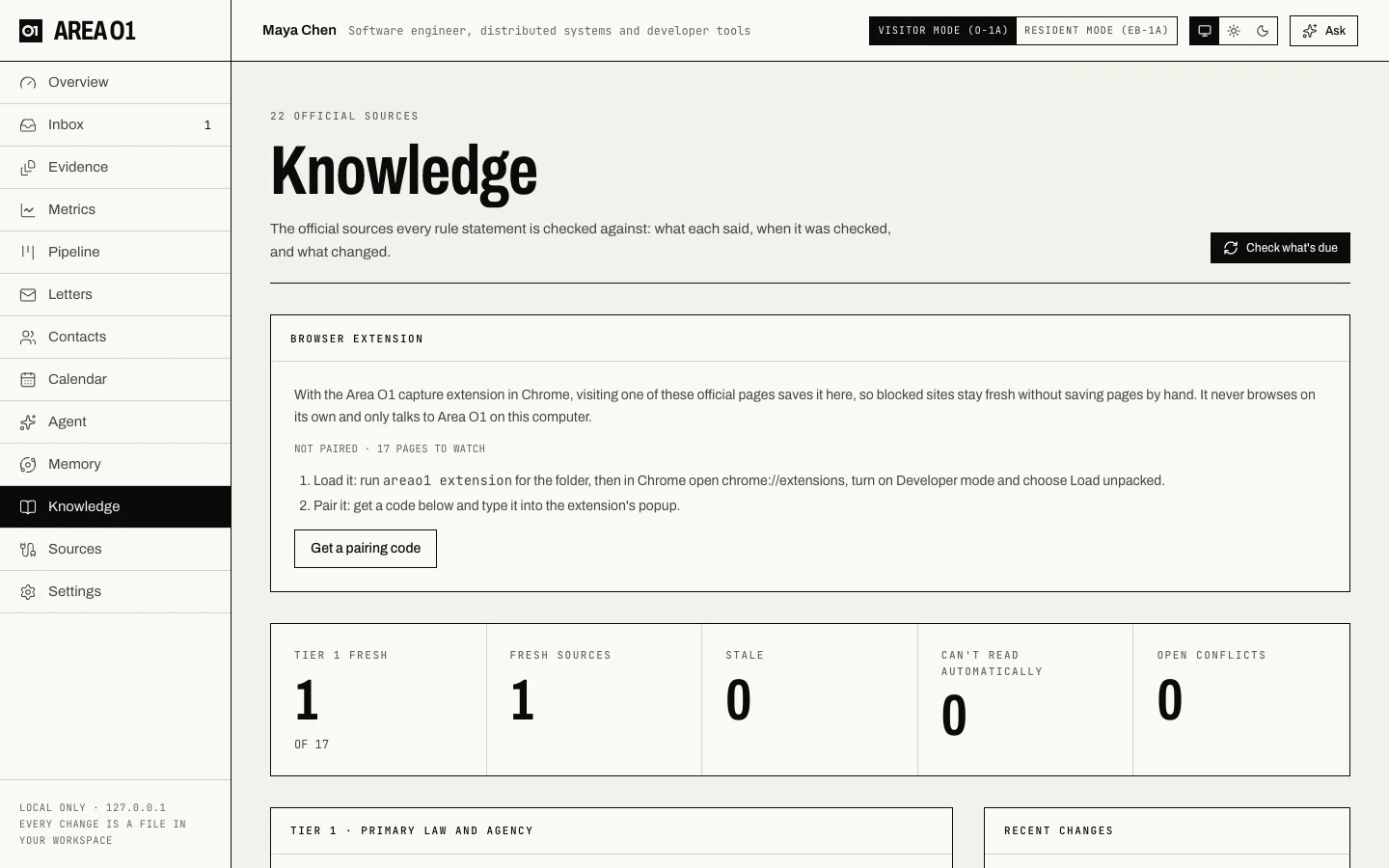
The vault is a local library of the official pages that matter for O-1A and EB-1A: regulations, USCIS policy, forms and fees, the Visa Bulletin, decisions. You see it on the Knowledge page.
Sources and tiers
The list of sources is vault/sources.yaml, shipped with the app. Each source has a URL, a tier and a kind of fact:
| Tier | What | Used for |
|---|---|---|
| 1 | Primary law and agency pages (uscis.gov, ecfr.gov, federalregister.gov, travel.state.gov and others) | Verifying rule statements. |
| 2 | Adjudication (federal court sites) | Verifying rule statements. |
| 3 | Secondary sources | Context only. Never verifies anything. |
A Tier 1 source must be on the official Tier 1 domain list, and a Tier 2 source on one of the two lists, so nothing else can be promoted to verify rules. Where a secondary copy and its primary disagree (the USCIS fee page and the fee regulation in 8 CFR part 106, for example), the primary governs.
A workspace can add or override sources in its own vault/sources.yaml, in the same format.
Snapshots and local search
Each fetch is saved as a snapshot named by its hash, in .areao1/cache/vault/. Old snapshots are kept. The small vault/log.jsonl in your workspace records each check: new, changed, unreadable or error.
The current snapshot of each source is indexed for search on your computer, with full-text search plus a simple local embedding. No model is downloaded and nothing is sent anywhere to search. Try it:
areao1 vault search "judging the work of others"
Other vault commands: areao1 vault status (each source's tier and freshness), areao1 vault sync (fetch what's due; --force re-fetches) and areao1 vault import <source> <file> (import a page you saved from your browser). See Commands.
Pages that block automated reading
Some official sites, such as uscis.gov and travel.state.gov, often refuse automated clients. Area O1 doesn't disguise itself to get past that. It records the page as unreadable and never stores the block page as content. For those sources you can:
- install the capture extension, which saves the page when you visit it,
- let the community library supply a hash-checked copy, or
- save the page in your browser and import it, on the Knowledge page or with
areao1 vault import.
Freshness
A source is only trusted while it's fresh. There are two ways a source stays fresh.
Change signals. Most rule sources name a signal (o1, eb1, fees, forms). Area O1 watches two official change feeds:
- the Federal Register: final rules from USCIS and DHS that touch the signal's CFR parts or terms, counted once they take effect;
- eCFR: the latest amendment date of each watched section.
A source with a signal stays fresh until a relevant change takes effect after your copy was taken. This holds only while the signals were checked in the last three days; otherwise the timer applies, so being offline never makes a stale fact look fresh.
Timers. Sources with no signal (processing times, the Visa Bulletin) use a freshness window per kind of fact: 7 days for fees, forms and processing times, monthly for the Visa Bulletin, 30 days for regulations and policy, 365 for case law.
A failed or blocked fetch never refreshes a source.
On the Knowledge page each source shows as fresh, stale, unreadable, error or never fetched.
The rule check
What gets checked
- every final answer from the in-app agent,
- every published weekly briefing,
- text the agent writes for your records: an evidence candidate's title and summary, a letter writer's credentials and asks, an email draft's body.
Sentences that may state a rule are picked out by patterns: CFR sections, USCIS, fees and dollar amounts, form numbers, day counts, criteria counts and similar. Each one is matched against Tier 1 and 2 excerpts in the vault, and one model call judges whether an excerpt supports or contradicts it, quoting the excerpt.
Then code, not the model, decides the status. The quote must really be in the excerpt, and the excerpt must come from the source's current, fresh snapshot.
The badges
| Badge | Meaning |
|---|---|
| verified | A fresh Tier 1 or 2 source supports it, and no fresh Tier 1 source contradicts it. |
| unverified | Anything else, including when the vault or the model is unavailable. |
| stale | The only support is a source past its freshness. |
| conflict | Tier 1 sources disagree. You also get a notification, and it's listed under Open conflicts on the Knowledge page. |
Statuses are recomputed whenever a check is shown or used, so a verified statement turns stale when its source changes.
Some plain case facts ("3 of 8 criteria banked") can show as unverified, because a criteria count always gets checked. That's expected.
The gate
A statement that isn't verified can't enter your records as the agent wrote it:
- the agent's write tools refuse text with a rule that isn't verified,
- accepting an Inbox item re-checks freshness at that moment and refuses if a rule is no longer verified,
- when you rewrite the text yourself, the words are yours and the check is cleared.
The vault-watch job
vault-watch runs every day at 06:00 (see schedules in Configuration). It:
- checks the change signals,
- pulls newer hash-checked snapshots from the community library for blocked pages (unless you turned that off),
- re-checks every Tier 1 source, and any other source that's stale,
- sends a notification when a Tier 1 source changed, with the first changed lines.
For a blocked page, you get one reminder only when a relevant rule actually changed (or its timer lapsed, for sources with no signal) and no newer copy exists from the extension or the community library. The reminder links to the page; with the extension installed, opening it is enough.
Run it by hand with areao1 run vault-watch. To turn all vault fetching off, set vault: {enabled: false} in areao1.yaml; rule statements then show as unverified.